
Click through Redact Pet
A copy of the app's screen, filled with fictional sample files. It runs in your browser. Nothing is uploaded or processed, and the work is sped up.
Redact Pet
Local redaction for medical-record PDFs
First time here? Three steps.
- Add PDFs or a folder of PDFs (searchable, scanned or mixed).
- Choose folder for the cleaned copies: a different folder from the originals.
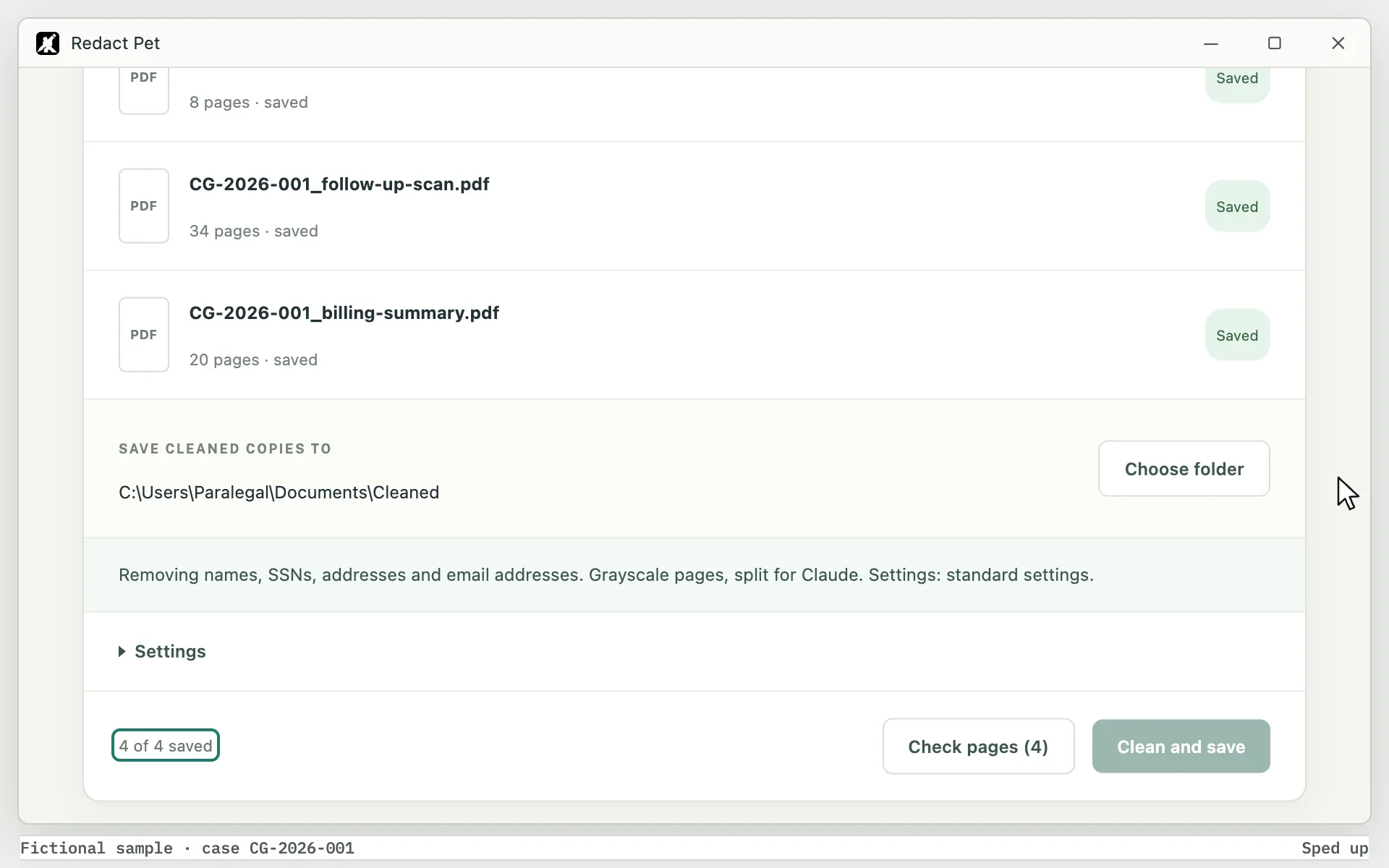
- Clean and save. Each file gets a cleaned PDF (in parts of up to 100 pages for long files) and a Markdown copy of its text.
BEFORE RECORDS GO TO AN AI TOOL
Remove names, SSNs and addresses.
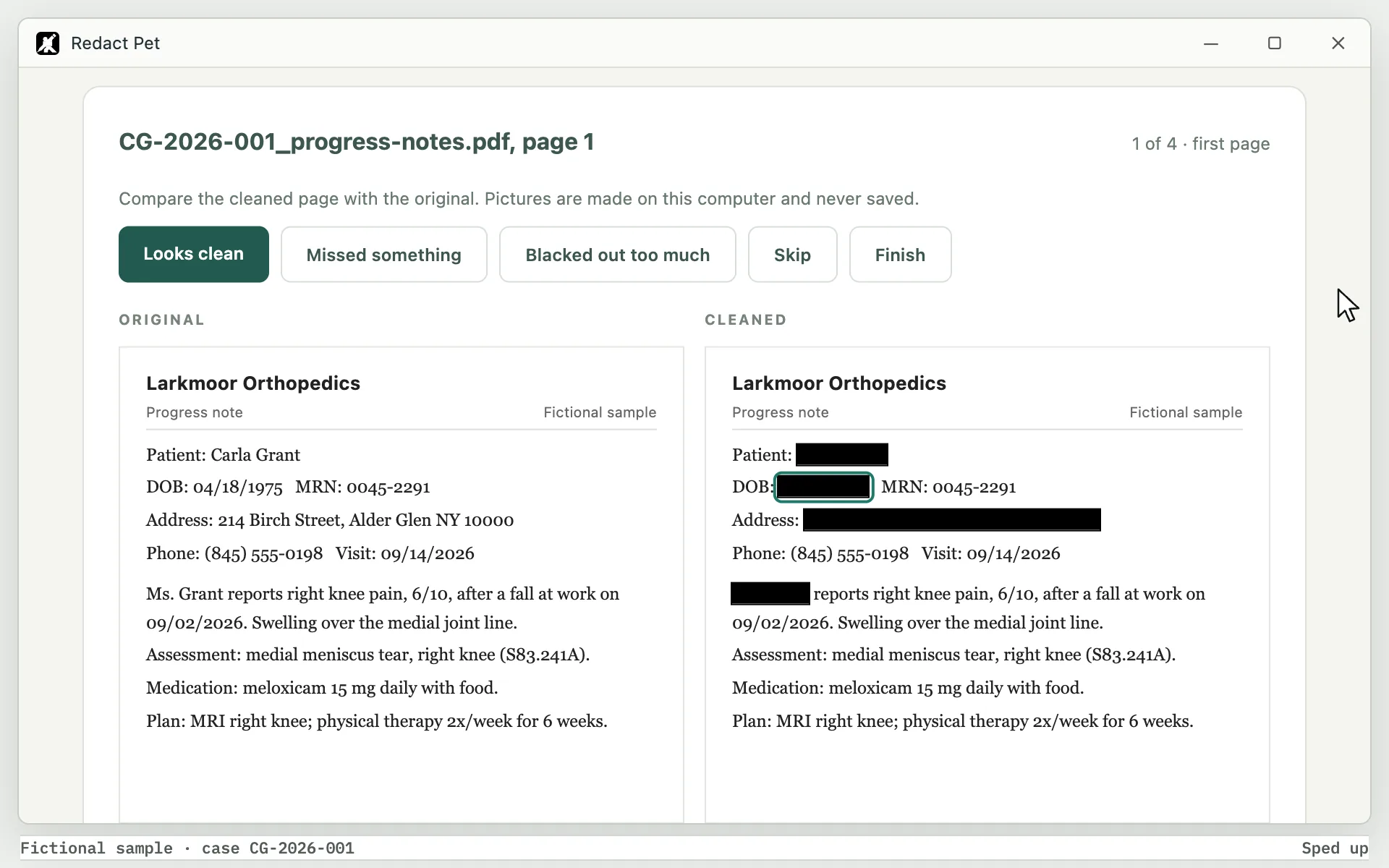
Redact Pet blacks out person names, Social Security numbers and postal addresses in PDF medical records and saves clean copies, ready to upload to Claude. When it is unsure about a word, it blacks it out.
Visit and treatment dates, diagnoses, medications, doses, lab values, procedures and facility names.
Documents 0
Searchable, scanned and mixed PDFs
Choose an output folder
Removing names, SSNs, addresses and email addresses. Grayscale pages, split for Claude. Settings: standard settings.
Settings
Ready
Saved in your output folder
Cleaned copies; originals unchangedCheck mode
Compare the cleaned page with the original. Pictures are made on this computer and never saved.
Pilot report: exactly what will be saved
Counts and case codes only: no names, no text from records, no file names. Nothing is sent anywhere; you choose where to save it.
Redact Pet · demo build
Originals are never changed. Each cleaned file has a text layer with [NAME], [SSN], [ADDRESS] and [REMOVED] in place of what was blacked out, plus a Markdown copy. Spot-check results against the originals.
Watch it run.
Add a folder, choose where the cleaned copies go, then Clean and save. Each file gets a cleaned PDF, a text copy and a certificate.
Redact Pet
Local redaction for medical-record PDFs
BEFORE RECORDS GO TO AN AI TOOL
Remove names, SSNs and addresses.
Redact Pet blacks out person names, Social Security numbers and postal addresses in PDF medical records and saves clean copies, ready to upload to Claude. When it is unsure about a word, it blacks it out.
Documents 0
Searchable, scanned and mixed PDFs
Folder: every PDF directly inside it
Queued
Queued
Queued
Queued
Choose an output folder
Removing names, SSNs, addresses and email addresses. Grayscale pages, split for Claude. Settings: standard settings.
Ready
Check pages (4)Clean and saveSaved in your output folder
Cleaned copies; originals unchangedCG-2026-001_progress-notes.pdf, page 1
1 of 4 · first pageCompare the cleaned page with the original. Pictures are made on this computer and never saved.
Larkmoor Orthopedics
Patient: Carla Grant
DOB: 04/18/1975 MRN: 0045-2291
Address: 214 Birch Street, Alder Glen NY 10000
Phone: (845) 555-0198 Visit: 09/14/2026
Ms. Grant reports right knee pain, 6/10, after a fall at work on 09/02/2026. Swelling over the medial joint line.
Assessment: medial meniscus tear, right knee (S83.241A).
Medication: meloxicam 15 mg daily with food.
Plan: MRI right knee; physical therapy 2x/week for 6 weeks.
RE: GRANT, CARLA DOB 04/18/1975
ACCT# ED-7781302
CHIEF COMPLAINT: R wrist pain after fall.
VITALS: BP 132/84, HR 88, T 98.4 F
X-RAY: nondisplaced distal radius fx.
DX: S52.501A
RX: ibuprofen 400 mg q6h prn pain
DISPO: home, splint, ortho f/u 1 wk
Patient intake and billing
| Patient name | Carla Grant |
| SSN | 000-41-7782 |
| Address | 214 Birch Street, Alder Glen NY 10000 |
| c.grant@example.com | |
| Member ID | HVP-55813-02 |
| Service | 99213 office visit, 09/14/2026 |
| Service | 73721 MRI knee w/o contrast |
| Diagnosis | S83.241A |
Larkmoor Orthopedics
Patient: Carla Grant
DOB: 04/18/1975 MRN: 0045-2291
Address: 214 Birch Street, Alder Glen NY 10000
Phone: (845) 555-0198 Visit: 09/14/2026
Ms. Grant reports right knee pain, 6/10, after a fall at work on 09/02/2026. Swelling over the medial joint line.
Assessment: medial meniscus tear, right knee (S83.241A).
Medication: meloxicam 15 mg daily with food.
Plan: MRI right knee; physical therapy 2x/week for 6 weeks.
RE: GRANT, CARLA DOB 04/18/1975
ACCT# ED-7781302
CHIEF COMPLAINT: R wrist pain after fall.
VITALS: BP 132/84, HR 88, T 98.4 F
X-RAY: nondisplaced distal radius fx.
DX: S52.501A
RX: ibuprofen 400 mg q6h prn pain
DISPO: home, splint, ortho f/u 1 wk
Patient intake and billing
| Patient name | Carla Grant |
| SSN | 000-41-7782 |
| Address | 214 Birch Street, Alder Glen NY 10000 |
| c.grant@example.com | |
| Member ID | HVP-55813-02 |
| Service | 99213 office visit, 09/14/2026 |
| Service | 73721 MRI knee w/o contrast |
| Diagnosis | S83.241A |
Pilot report: exactly what will be saved
Counts and case codes only: no names, no text from records, no file names. Nothing is sent anywhere; you choose where to save it.
Redact Pet · demo build
Originals are never changed. Each cleaned file has a text layer with [NAME], [SSN], [ADDRESS] and [REMOVED] in place of what was blacked out, plus a Markdown copy. Spot-check results against the originals.
Remove more when you need to.
Names, SSNs and addresses are always removed, and email addresses are on by default. Dates of birth, phone and fax numbers, and record, account and member numbers can be switched on in Settings.
Redact Pet
Local redaction for medical-record PDFs
BEFORE RECORDS GO TO AN AI TOOL
Remove names, SSNs and addresses.
Redact Pet blacks out person names, Social Security numbers and postal addresses in PDF medical records and saves clean copies, ready to upload to Claude. When it is unsure about a word, it blacks it out.
Documents 0
Searchable, scanned and mixed PDFs
Folder: every PDF directly inside it
Queued
Queued
Queued
Queued
Choose an output folder
Removing names, SSNs, addresses and email addresses. Grayscale pages, split for Claude. Settings: standard settings.
Ready
Check pages (4)Clean and saveSaved in your output folder
Cleaned copies; originals unchangedCG-2026-001_progress-notes.pdf, page 1
1 of 4 · first pageCompare the cleaned page with the original. Pictures are made on this computer and never saved.
Larkmoor Orthopedics
Patient: Carla Grant
DOB: 04/18/1975 MRN: 0045-2291
Address: 214 Birch Street, Alder Glen NY 10000
Phone: (845) 555-0198 Visit: 09/14/2026
Ms. Grant reports right knee pain, 6/10, after a fall at work on 09/02/2026. Swelling over the medial joint line.
Assessment: medial meniscus tear, right knee (S83.241A).
Medication: meloxicam 15 mg daily with food.
Plan: MRI right knee; physical therapy 2x/week for 6 weeks.
RE: GRANT, CARLA DOB 04/18/1975
ACCT# ED-7781302
CHIEF COMPLAINT: R wrist pain after fall.
VITALS: BP 132/84, HR 88, T 98.4 F
X-RAY: nondisplaced distal radius fx.
DX: S52.501A
RX: ibuprofen 400 mg q6h prn pain
DISPO: home, splint, ortho f/u 1 wk
Patient intake and billing
| Patient name | Carla Grant |
| SSN | 000-41-7782 |
| Address | 214 Birch Street, Alder Glen NY 10000 |
| c.grant@example.com | |
| Member ID | HVP-55813-02 |
| Service | 99213 office visit, 09/14/2026 |
| Service | 73721 MRI knee w/o contrast |
| Diagnosis | S83.241A |
Larkmoor Orthopedics
Patient: Carla Grant
DOB: 04/18/1975 MRN: 0045-2291
Address: 214 Birch Street, Alder Glen NY 10000
Phone: (845) 555-0198 Visit: 09/14/2026
Ms. Grant reports right knee pain, 6/10, after a fall at work on 09/02/2026. Swelling over the medial joint line.
Assessment: medial meniscus tear, right knee (S83.241A).
Medication: meloxicam 15 mg daily with food.
Plan: MRI right knee; physical therapy 2x/week for 6 weeks.
RE: GRANT, CARLA DOB 04/18/1975
ACCT# ED-7781302
CHIEF COMPLAINT: R wrist pain after fall.
VITALS: BP 132/84, HR 88, T 98.4 F
X-RAY: nondisplaced distal radius fx.
DX: S52.501A
RX: ibuprofen 400 mg q6h prn pain
DISPO: home, splint, ortho f/u 1 wk
Patient intake and billing
| Patient name | Carla Grant |
| SSN | 000-41-7782 |
| Address | 214 Birch Street, Alder Glen NY 10000 |
| c.grant@example.com | |
| Member ID | HVP-55813-02 |
| Service | 99213 office visit, 09/14/2026 |
| Service | 73721 MRI knee w/o contrast |
| Diagnosis | S83.241A |
Pilot report: exactly what will be saved
Counts and case codes only: no names, no text from records, no file names. Nothing is sent anywhere; you choose where to save it.
Redact Pet · demo build
Originals are never changed. Each cleaned file has a text layer with [NAME], [SSN], [ADDRESS] and [REMOVED] in place of what was blacked out, plus a Markdown copy. Spot-check results against the originals.
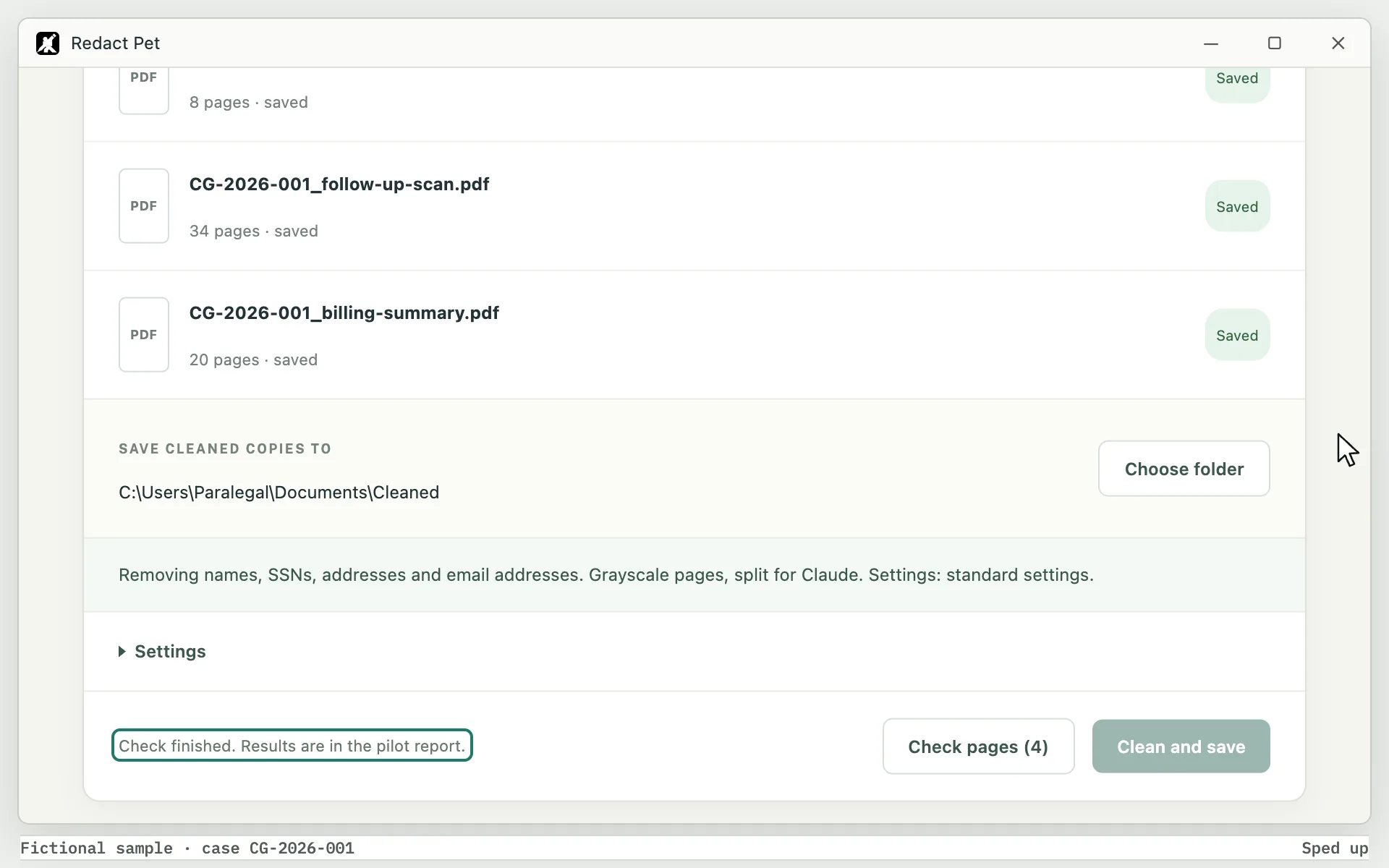
Check the copies before you share them.
Check pages puts each cleaned page next to its original, starting with the pages most worth a look: first pages, signatures, form boxes, handwriting and fax pages.
Redact Pet
Local redaction for medical-record PDFs
BEFORE RECORDS GO TO AN AI TOOL
Remove names, SSNs and addresses.
Redact Pet blacks out person names, Social Security numbers and postal addresses in PDF medical records and saves clean copies, ready to upload to Claude. When it is unsure about a word, it blacks it out.
Documents 0
Searchable, scanned and mixed PDFs
Folder: every PDF directly inside it
Queued
Queued
Queued
Queued
Choose an output folder
Removing names, SSNs, addresses and email addresses. Grayscale pages, split for Claude. Settings: standard settings.
Ready
Check pages (4)Clean and saveSaved in your output folder
Cleaned copies; originals unchangedCG-2026-001_progress-notes.pdf, page 1
1 of 4 · first pageCompare the cleaned page with the original. Pictures are made on this computer and never saved.
Larkmoor Orthopedics
Patient: Carla Grant
DOB: 04/18/1975 MRN: 0045-2291
Address: 214 Birch Street, Alder Glen NY 10000
Phone: (845) 555-0198 Visit: 09/14/2026
Ms. Grant reports right knee pain, 6/10, after a fall at work on 09/02/2026. Swelling over the medial joint line.
Assessment: medial meniscus tear, right knee (S83.241A).
Medication: meloxicam 15 mg daily with food.
Plan: MRI right knee; physical therapy 2x/week for 6 weeks.
RE: GRANT, CARLA DOB 04/18/1975
ACCT# ED-7781302
CHIEF COMPLAINT: R wrist pain after fall.
VITALS: BP 132/84, HR 88, T 98.4 F
X-RAY: nondisplaced distal radius fx.
DX: S52.501A
RX: ibuprofen 400 mg q6h prn pain
DISPO: home, splint, ortho f/u 1 wk
Patient intake and billing
| Patient name | Carla Grant |
| SSN | 000-41-7782 |
| Address | 214 Birch Street, Alder Glen NY 10000 |
| c.grant@example.com | |
| Member ID | HVP-55813-02 |
| Service | 99213 office visit, 09/14/2026 |
| Service | 73721 MRI knee w/o contrast |
| Diagnosis | S83.241A |
Larkmoor Orthopedics
Patient: Carla Grant
DOB: 04/18/1975 MRN: 0045-2291
Address: 214 Birch Street, Alder Glen NY 10000
Phone: (845) 555-0198 Visit: 09/14/2026
Ms. Grant reports right knee pain, 6/10, after a fall at work on 09/02/2026. Swelling over the medial joint line.
Assessment: medial meniscus tear, right knee (S83.241A).
Medication: meloxicam 15 mg daily with food.
Plan: MRI right knee; physical therapy 2x/week for 6 weeks.
RE: GRANT, CARLA DOB 04/18/1975
ACCT# ED-7781302
CHIEF COMPLAINT: R wrist pain after fall.
VITALS: BP 132/84, HR 88, T 98.4 F
X-RAY: nondisplaced distal radius fx.
DX: S52.501A
RX: ibuprofen 400 mg q6h prn pain
DISPO: home, splint, ortho f/u 1 wk
Patient intake and billing
| Patient name | Carla Grant |
| SSN | 000-41-7782 |
| Address | 214 Birch Street, Alder Glen NY 10000 |
| c.grant@example.com | |
| Member ID | HVP-55813-02 |
| Service | 99213 office visit, 09/14/2026 |
| Service | 73721 MRI knee w/o contrast |
| Diagnosis | S83.241A |
Pilot report: exactly what will be saved
Counts and case codes only: no names, no text from records, no file names. Nothing is sent anywhere; you choose where to save it.
Redact Pet · demo build
Originals are never changed. Each cleaned file has a text layer with [NAME], [SSN], [ADDRESS] and [REMOVED] in place of what was blacked out, plus a Markdown copy. Spot-check results against the originals.
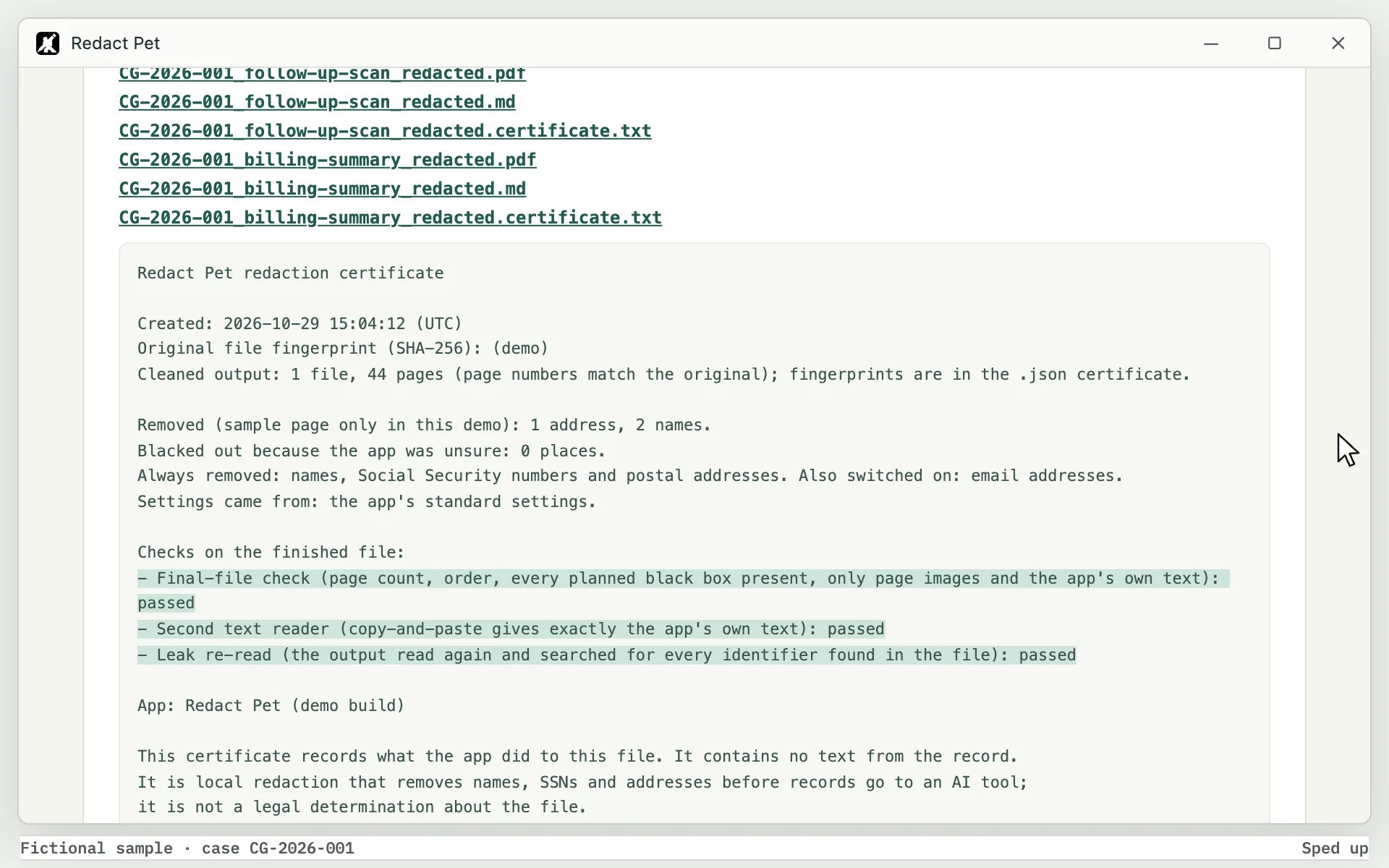
A certificate for every file.
It records what was removed and which checks ran on the finished file. It contains no text from the record.
Redact Pet
Local redaction for medical-record PDFs
BEFORE RECORDS GO TO AN AI TOOL
Remove names, SSNs and addresses.
Redact Pet blacks out person names, Social Security numbers and postal addresses in PDF medical records and saves clean copies, ready to upload to Claude. When it is unsure about a word, it blacks it out.
Documents 0
Searchable, scanned and mixed PDFs
Folder: every PDF directly inside it
Queued
Queued
Queued
Queued
Choose an output folder
Removing names, SSNs, addresses and email addresses. Grayscale pages, split for Claude. Settings: standard settings.
Ready
Check pages (4)Clean and saveSaved in your output folder
Cleaned copies; originals unchangedCG-2026-001_progress-notes.pdf, page 1
1 of 4 · first pageCompare the cleaned page with the original. Pictures are made on this computer and never saved.
Larkmoor Orthopedics
Patient: Carla Grant
DOB: 04/18/1975 MRN: 0045-2291
Address: 214 Birch Street, Alder Glen NY 10000
Phone: (845) 555-0198 Visit: 09/14/2026
Ms. Grant reports right knee pain, 6/10, after a fall at work on 09/02/2026. Swelling over the medial joint line.
Assessment: medial meniscus tear, right knee (S83.241A).
Medication: meloxicam 15 mg daily with food.
Plan: MRI right knee; physical therapy 2x/week for 6 weeks.
RE: GRANT, CARLA DOB 04/18/1975
ACCT# ED-7781302
CHIEF COMPLAINT: R wrist pain after fall.
VITALS: BP 132/84, HR 88, T 98.4 F
X-RAY: nondisplaced distal radius fx.
DX: S52.501A
RX: ibuprofen 400 mg q6h prn pain
DISPO: home, splint, ortho f/u 1 wk
Patient intake and billing
| Patient name | Carla Grant |
| SSN | 000-41-7782 |
| Address | 214 Birch Street, Alder Glen NY 10000 |
| c.grant@example.com | |
| Member ID | HVP-55813-02 |
| Service | 99213 office visit, 09/14/2026 |
| Service | 73721 MRI knee w/o contrast |
| Diagnosis | S83.241A |
Larkmoor Orthopedics
Patient: Carla Grant
DOB: 04/18/1975 MRN: 0045-2291
Address: 214 Birch Street, Alder Glen NY 10000
Phone: (845) 555-0198 Visit: 09/14/2026
Ms. Grant reports right knee pain, 6/10, after a fall at work on 09/02/2026. Swelling over the medial joint line.
Assessment: medial meniscus tear, right knee (S83.241A).
Medication: meloxicam 15 mg daily with food.
Plan: MRI right knee; physical therapy 2x/week for 6 weeks.
RE: GRANT, CARLA DOB 04/18/1975
ACCT# ED-7781302
CHIEF COMPLAINT: R wrist pain after fall.
VITALS: BP 132/84, HR 88, T 98.4 F
X-RAY: nondisplaced distal radius fx.
DX: S52.501A
RX: ibuprofen 400 mg q6h prn pain
DISPO: home, splint, ortho f/u 1 wk
Patient intake and billing
| Patient name | Carla Grant |
| SSN | 000-41-7782 |
| Address | 214 Birch Street, Alder Glen NY 10000 |
| c.grant@example.com | |
| Member ID | HVP-55813-02 |
| Service | 99213 office visit, 09/14/2026 |
| Service | 73721 MRI knee w/o contrast |
| Diagnosis | S83.241A |
Pilot report: exactly what will be saved
Counts and case codes only: no names, no text from records, no file names. Nothing is sent anywhere; you choose where to save it.
Redact Pet · demo build
Originals are never changed. Each cleaned file has a text layer with [NAME], [SSN], [ADDRESS] and [REMOVED] in place of what was blacked out, plus a Markdown copy. Spot-check results against the originals.
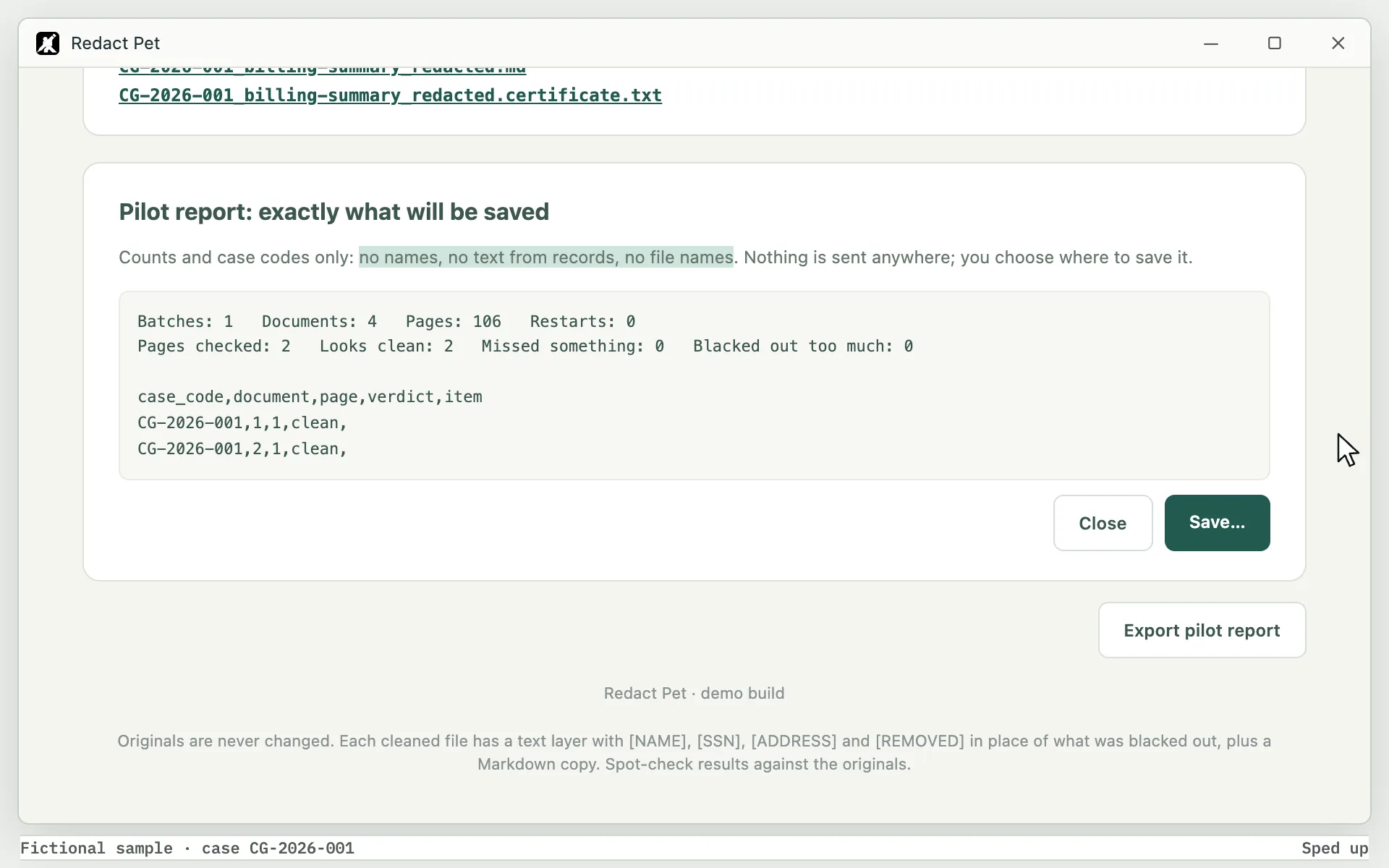
A pilot report with counts only.
No names, no text from records, no file names. Nothing is sent anywhere; you choose where to save it.
Redact Pet
Local redaction for medical-record PDFs
BEFORE RECORDS GO TO AN AI TOOL
Remove names, SSNs and addresses.
Redact Pet blacks out person names, Social Security numbers and postal addresses in PDF medical records and saves clean copies, ready to upload to Claude. When it is unsure about a word, it blacks it out.
Documents 0
Searchable, scanned and mixed PDFs
Folder: every PDF directly inside it
Queued
Queued
Queued
Queued
Choose an output folder
Removing names, SSNs, addresses and email addresses. Grayscale pages, split for Claude. Settings: standard settings.
Ready
Check pages (4)Clean and saveSaved in your output folder
Cleaned copies; originals unchangedCG-2026-001_progress-notes.pdf, page 1
1 of 4 · first pageCompare the cleaned page with the original. Pictures are made on this computer and never saved.
Larkmoor Orthopedics
Patient: Carla Grant
DOB: 04/18/1975 MRN: 0045-2291
Address: 214 Birch Street, Alder Glen NY 10000
Phone: (845) 555-0198 Visit: 09/14/2026
Ms. Grant reports right knee pain, 6/10, after a fall at work on 09/02/2026. Swelling over the medial joint line.
Assessment: medial meniscus tear, right knee (S83.241A).
Medication: meloxicam 15 mg daily with food.
Plan: MRI right knee; physical therapy 2x/week for 6 weeks.
RE: GRANT, CARLA DOB 04/18/1975
ACCT# ED-7781302
CHIEF COMPLAINT: R wrist pain after fall.
VITALS: BP 132/84, HR 88, T 98.4 F
X-RAY: nondisplaced distal radius fx.
DX: S52.501A
RX: ibuprofen 400 mg q6h prn pain
DISPO: home, splint, ortho f/u 1 wk
Patient intake and billing
| Patient name | Carla Grant |
| SSN | 000-41-7782 |
| Address | 214 Birch Street, Alder Glen NY 10000 |
| c.grant@example.com | |
| Member ID | HVP-55813-02 |
| Service | 99213 office visit, 09/14/2026 |
| Service | 73721 MRI knee w/o contrast |
| Diagnosis | S83.241A |
Larkmoor Orthopedics
Patient: Carla Grant
DOB: 04/18/1975 MRN: 0045-2291
Address: 214 Birch Street, Alder Glen NY 10000
Phone: (845) 555-0198 Visit: 09/14/2026
Ms. Grant reports right knee pain, 6/10, after a fall at work on 09/02/2026. Swelling over the medial joint line.
Assessment: medial meniscus tear, right knee (S83.241A).
Medication: meloxicam 15 mg daily with food.
Plan: MRI right knee; physical therapy 2x/week for 6 weeks.
RE: GRANT, CARLA DOB 04/18/1975
ACCT# ED-7781302
CHIEF COMPLAINT: R wrist pain after fall.
VITALS: BP 132/84, HR 88, T 98.4 F
X-RAY: nondisplaced distal radius fx.
DX: S52.501A
RX: ibuprofen 400 mg q6h prn pain
DISPO: home, splint, ortho f/u 1 wk
Patient intake and billing
| Patient name | Carla Grant |
| SSN | 000-41-7782 |
| Address | 214 Birch Street, Alder Glen NY 10000 |
| c.grant@example.com | |
| Member ID | HVP-55813-02 |
| Service | 99213 office visit, 09/14/2026 |
| Service | 73721 MRI knee w/o contrast |
| Diagnosis | S83.241A |
Pilot report: exactly what will be saved
Counts and case codes only: no names, no text from records, no file names. Nothing is sent anywhere; you choose where to save it.
Redact Pet · demo build
Originals are never changed. Each cleaned file has a text layer with [NAME], [SSN], [ADDRESS] and [REMOVED] in place of what was blacked out, plus a Markdown copy. Spot-check results against the originals.
The real app runs on Windows and does this work on your own PC.